Custody calendar: 50/50 schedule examples
A good custody calendar tells everyone, kids included, where they sleep each night. Here are the most common schedules, drawn over two weeks, and how to pick the right one for your family.
What are the most common custody schedules?
Five schedules cover most families: week on/week off, 2-2-3, 2-2-5-5, 3-4-4-3 and every other weekend. The first four are 50/50, 7 nights each every 14 days; they differ in how many handovers there are and how many days in a row a child spends away from each parent.
| Schedule | Nights in 14 days | Handovers in 14 days | Longest time away | Good for |
|---|---|---|---|---|
| 2-2-3 | 7–7 | 6 | 3 days | young children |
| Week on, week off | 7–7 | 2 | 7 days | older kids, homes far apart |
| 2-2-5-5 | 7–7 | 4 | 5 days | the same school days every week |
| 3-4-4-3 | 7–7 | 4 | 4 days | 50/50 with midweek handovers |
| Every other weekend | 12–2 | 2 | 12 days | one main home |
Calculated on the 14-day cycles FamSync uses, repeating unchanged.
2-2-3 7–7 nights
Two days each, then three, alternating: the kids are never more than three days away from either parent. Good for young children.
Week on, week off 7–7 nights
One week with one parent, the next with the other. Few handovers: good for older kids and parents who live far apart.
2-2-5-5 7–7 nights
Each parent always has the same weekdays, plus alternating long weekends. Easy for school and activities.
3-4-4-3 7–7 nights
Three days and four, then four and three: half the time each, with midweek handovers.
Every other weekend 12–2 nights
The kids live with one parent and spend every other weekend with the other.
How do you choose a custody schedule?
Three things matter most: your children's ages, the distance between the two homes, and school and work commitments. Families with young children often pick frequent handovers and short times apart, while older kids usually prefer fewer moves between homes.
- Your children's age: little ones struggle with long stretches apart; with 2-2-3 they never go more than three days without seeing a parent.
- Distance between homes: if you live far apart, fewer handovers are better; alternating weeks have one a week.
- School and activities: with 2-2-5-5 each parent always has the same weekdays.
- Work: a custom pattern suits parents who work weekends or shifts.
You choose the schedule together, or it's set in your parenting plan or custody order: FamSync puts it in the calendar exactly as it is.
2-2-3 or week on/week off: which is better?
It depends on what matters most to your family. Week on/week off has 2 handovers every two weeks, but children spend 7 days in a row away from one parent. The 2-2-3 raises handovers to 6 and cuts the longest time away to 3 days, which is why many families with young children choose it.
How do you set up a custody calendar in FamSync?
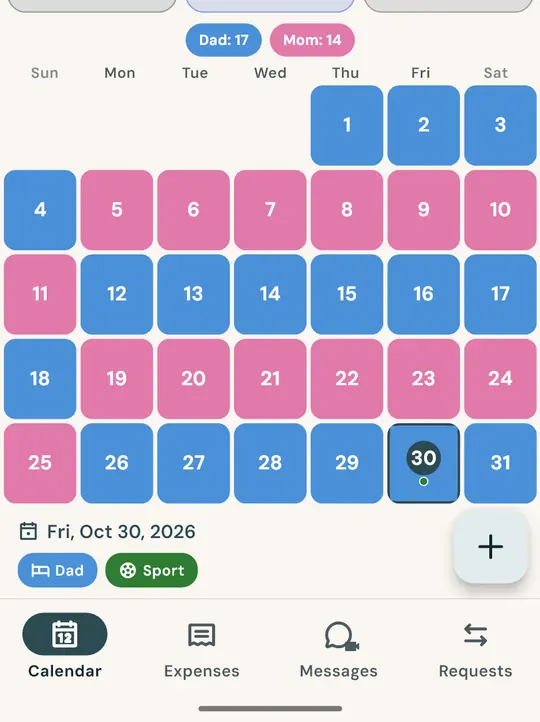
In FamSync you set the pattern once, pick the start day and the calendar repeats by itself. Both parents see the same calendar on their own phone, with each parent's nights and the overnight count.
- Vacations, holidays and long weekends as separate periods.
- Your country's public holidays already in the calendar.
- Schedule swaps requested and approved in the app, with date and time.
- Who has the kids tonight, from the Home screen widget.
Frequently asked questions
What is the most common 50/50 custody schedule?
It depends on the kids' age and the distance between homes. Alternating weeks is the simplest; 2-2-3 and 2-2-5-5 split the time equally with more frequent handovers.
Can I change the schedule later?
Yes. If your arrangement changes, set the new pattern and the calendar updates for both of you.
Does the other parent see the same calendar?
Yes, as soon as they join your family with the 6-character code. It works between iPhone and Android.
Your custody calendar, ready in a minute
Get FamSync for free and pick your schedule.